Activate TDengine Historian
This procedure describes how to activate a TDengine Historian license. The operations in this procedure are performed in TDengine TSDB-Enterprise, but the licensing applies to TDengine Historian, including both TDengine TSDB-Enterprise and TDengine IDMP.
Prerequisites
- Contact TDengine or an authorized reseller to purchase TDengine Historian.
- Install and deploy TDengine Historian (TDengine TSDB-Enterprise and TDengine IDMP) on the actual machines that you intend to license.
Procedure
Obtain Your Activation Code
- TDengine CLI
- TDengine TSDB Explorer
-
On the machine running TDengine TSDB-Enterprise, open the TDengine CLI as the
rootuser:taos -
Run the following SQL statement to obtain required information for your deployment:
SHOW CLUSTER MACHINES;Sample output is displayed as follows:
         id         | dnode_num |          machine         | version  |
=======================================================================
3609687158593567855 | 1 | Bdw+qvOCyvAOc3SS5GIyEOIi | 3.3.6.13 | -
Copy the entire output of the statement and send it to your account representative or authorized reseller. Also include the following information:
- The name of your company
- The name and email address of the primary technical contact
- The intended environment (production, PoC, or testing)
- The intended number of historian tags. For more information, see TDengine Historian Pricing.
- The desired term of the license
Your account representative or reseller will send you an activation code that you use to activate your TDengine Historian deployment.
-
Log in to TDengine TSDB Explorer as the
rootuser. The default URL ishttp://127.0.0.1:6060. -
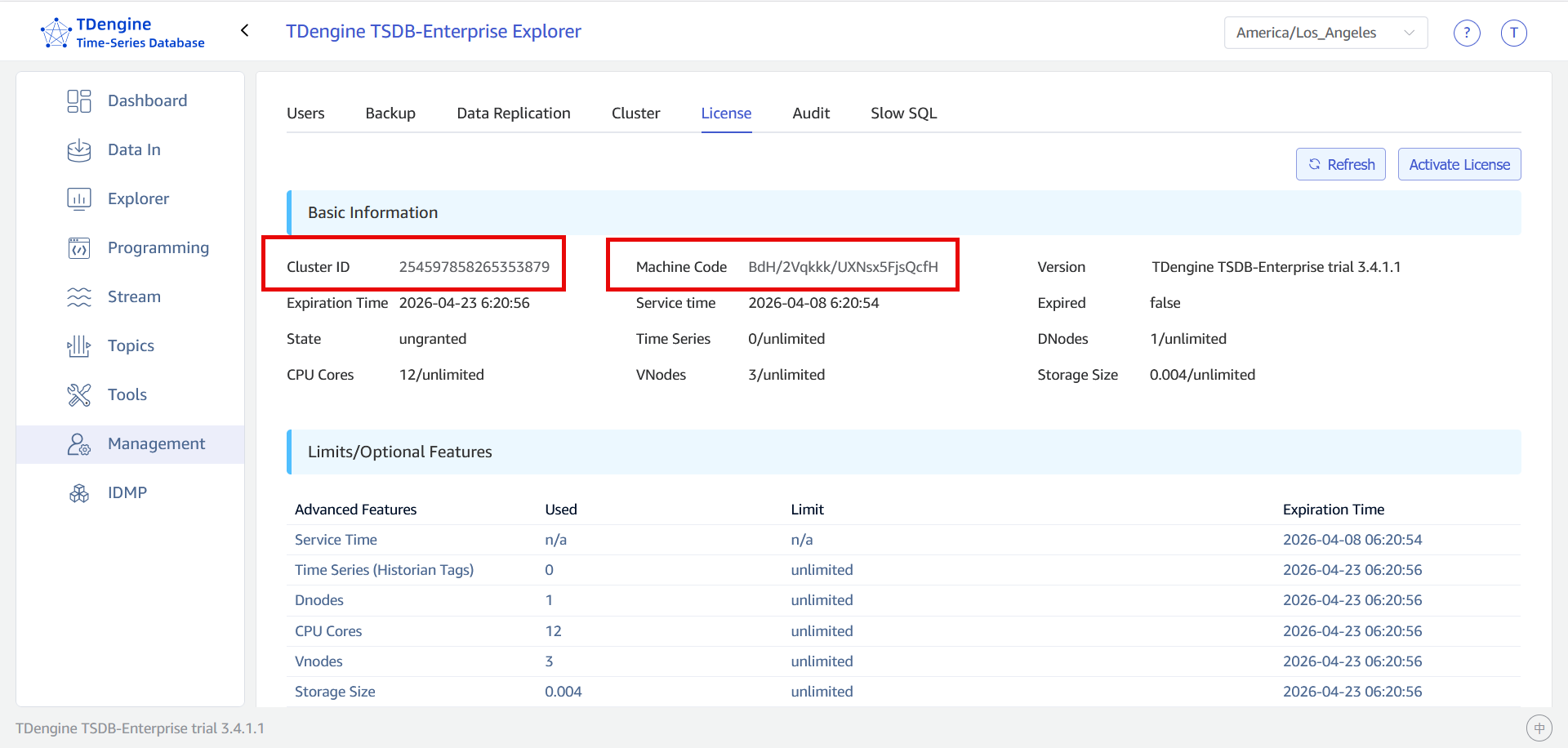
From the main menu on the left, select Management and open the License tab.
-
Copy the value of the Cluster ID and Machine Code values as shown below.
-
Send these values to your account representative or authorized reseller. Also include the following information:
- The name of your company
- The name and email address of the primary technical contact
- The intended environment (production, PoC, or testing)
- The intended number of historian tags. For more information, see TDengine Historian Pricing.
- The desired term of the license
Your account representative or reseller will send you an activation code that you use to activate your TDengine Historian deployment.
Activate Your Deployment
- TDengine CLI
- TDengine TSDB Explorer
-
On the machine running TDengine TSDB-Enterprise, open the TDengine CLI as the
rootuser.taos -
Apply the activation code to your cluster:
ALTER CLUSTER 'activeCode' '<your-activation-code>';
Your TDengine Historian deployment is now licensed. You can run the following SQL statement to view the details of your license, including expiration date:
SHOW GRANTS\G;
-
Once you receive your activation code, log in to TDengine TSDB Explorer as the
rootuser. The default URL ishttp://127.0.0.1:6060. -
From the main menu on the left, select Management. Open the License tab and click Activate License.
-
Enter your activation code and click Confirm.
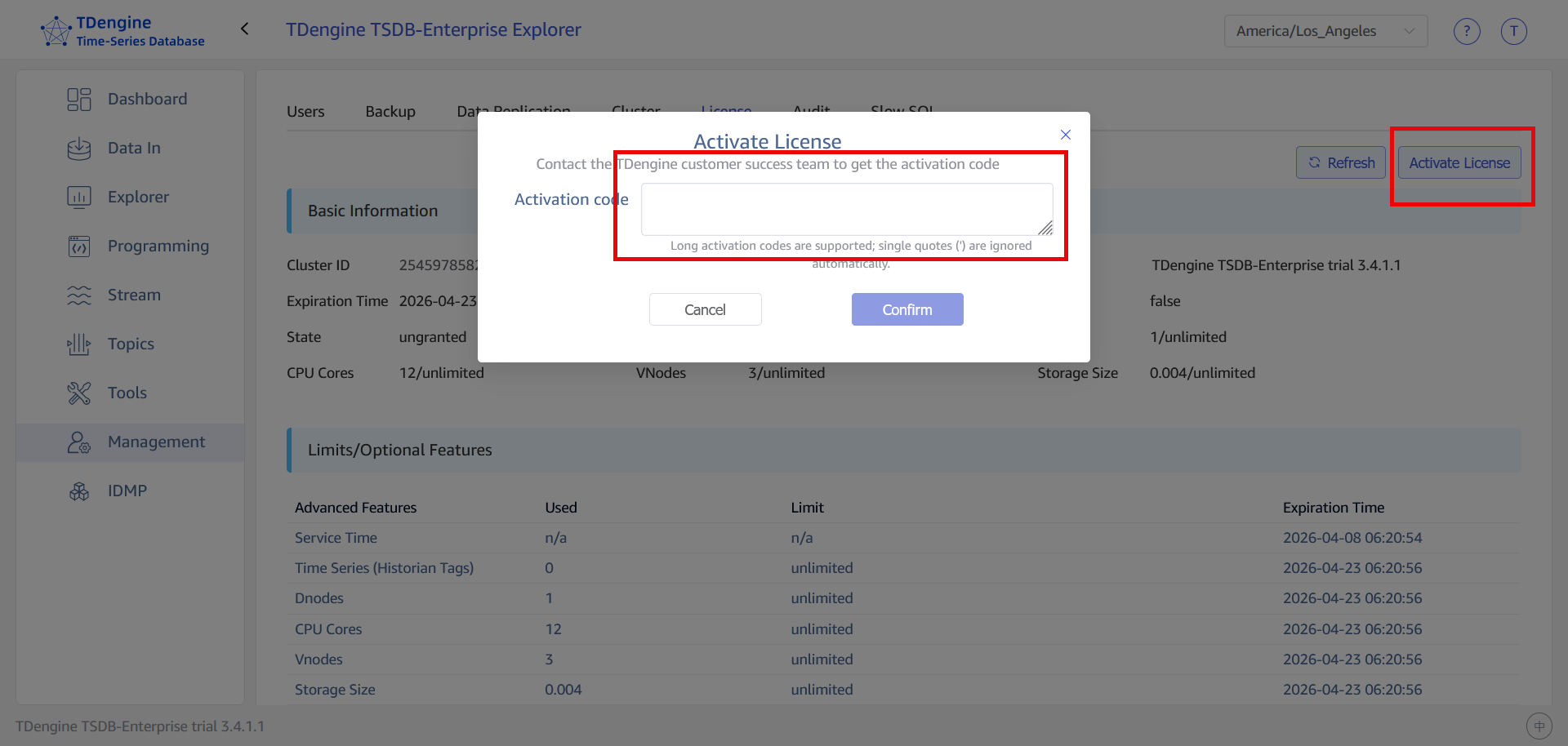
Your TDengine Historian deployment is now licensed. You can view the details of your license, including expiration date, on the License tab.
